Overlay two photo layers, one photo has to be your own photo, You only need to do one overlay for this assignment (10 marks)
Head switch, switching the head of one person with the body of another. One of the photos needs to be one of yours. Print out and hand in (10 marks)
NEW: 3 shots using red as a focal point, you can spot colour, but you do not have to. ( 10 marks)
NEW: 3 cloud shots...should look different each time you shoot clouds (10 marks)
NEW: 10 portraits choose 2 models and shoot 5 pics of each, mix up the poses and make sure you get some full body shots.VERY important to keep your background clean. ( 20 marks)
NEW: Filter shot: Using the filters in Photoshop, take one of your photos and turn it into an artistic piece. Please post both photos so I can see the changes made. Also do not just use one filter...play a bit to make the photo interesting. (10 marks)
Tuesday, March 3, 2015

Thursday, February 26, 2015
Thurs. Feb. 26
I am away today, please respect all of the rules and guidelines we have discussed when out of class taking photos and using cameras. Today is the last day to borrow any of the cards from Ms Chase unless you forget to bring your card every once and a while.
Please continue work on the following assignments in the order that they are listed.
Please continue work on the following assignments in the order that they are listed.
- finish up shooting assignment 1,2, and 3, and edit any of these photos in Pixlr, Pic Monkey or Photoshop for cropping and lighting. When finished upload to Flickr and organize into albums
- make sure you have a buddy icon (pic of yourself) on Flickr, and you have made Ms Chase a contact, You need to make sure all of your photos remain open for public viewing so I can see and mark them
- Spend some time on the editors playing around with photos so you can see how the different editing elements work. It is important to know how to use all three editors since some work better for different kinds of editing
NEW ASSIGNMENT: shooting colour 3 red shots. In this assignment, your focus in the shot is red. You should use a predominant red colour and make it your focal point. (Stay out of the red paint in the art room for today) but other items might work like pencil crayons, crayons, people's shirts, lipstick, an apple, a hat, stop sign…sometimes when you look, you might find red in the most uncommon places. You are focusing on colour in this assignment, but do not forget the other elements of composition when taking photos. Remember our goal is to get clear, in focus shots. ( 10 marks)
Check out the camera simulation on the Advanced Photo site if you have time.
Check out the camera simulation on the Advanced Photo site if you have time.
Tuesday, February 17, 2015
Welcome to Photo 10
Hopefully you are super excited to be taking Photography and this is a class you wanted.
YOU WILL NEED TO GET A 2 OR 4 GB SD CARD FOR NEXT WEEK. IT IS A REQUIREMENT OF THE COURSE. ( kinda like your notebook)
Assignment #1: Two head shots that are clear, in focus, up close with a clean background. These pics should be of 2 different people. (edit and post to Flickr) 10 marks
Assignment #2: Three shots of textures, shot face on and fill the frame.( edit post to Flickr) 10 marks
Assignment#3: Choose an element of composition and shoot three pics which show this element.
Ex fill the frame...make sure all shots demonstrate this concept. (edit and post to Flickr) 10 marks
LINK TO ADVANCED PHOTO INFO ON COMPOSITION
Advanced Photo
Link to Online Photo Editors
Pixlr Express
YOU WILL NEED TO GET A 2 OR 4 GB SD CARD FOR NEXT WEEK. IT IS A REQUIREMENT OF THE COURSE. ( kinda like your notebook)
Assignment #1: Two head shots that are clear, in focus, up close with a clean background. These pics should be of 2 different people. (edit and post to Flickr) 10 marks
Assignment #2: Three shots of textures, shot face on and fill the frame.( edit post to Flickr) 10 marks
Assignment#3: Choose an element of composition and shoot three pics which show this element.
Ex fill the frame...make sure all shots demonstrate this concept. (edit and post to Flickr) 10 marks
LINK TO ADVANCED PHOTO INFO ON COMPOSITION
Advanced Photo
Link to Online Photo Editors
Pixlr Express
Thursday, January 15, 2015
The following is a list of assignments that are due by Friday Jan. 30
- 3 Overlays on Flickr, all base photos must be your own 20 marks on Flickr
- Duplicity 20 marks on Flickr and printed out to be put on the wall
- Motivational Poster 10 marks on Flickr
- 6 Portraits using only 2 people 15 marks on Flickr
- Camera test 5 marks
- Slideshow 50 photos on Ms Chase's jump drive 50 marks
Total Marks: 130. All work is due: Mon Feb 2 and should be posted up onto Flickr in albums. Slideshows will be presented on Jan 29/30 in class. Any questions or concerns, please speak to Ms Chase.
Tuesday, January 6, 2015
Getting ideas for your Slideshow/ New Assignment
Inspirational ideas for shooting for your slideshow
- focus on a colour and go out and find objects that fit into that colour (check out colour groups on Flickr) You may even want to do some editing of spot colour
- shoot antique objects, I find old things just interesting to look at so they would make great photos
- shoot what you love, if you love soccer or dance or skateboarding, spend some time shooting what you know like your dog or cat or horse
- If you enjoy photoshop work, try checking out some trick photography lessons on you tube...have fun!
- check out pinterest photography site for inspiring ideas
- choose a favourite object and shoot it from a variety of angles
- try finding letters in basic objects
sports
artistic letter photo
Pinterest
NEW ASSIGNMENT: Motivational Poster using your own quote or a favourite quote and your own photo. To be put onto Flickr in its own album. ( 10 marks)
Motivational poster generator
artistic letter photo
NEW ASSIGNMENT: Motivational Poster using your own quote or a favourite quote and your own photo. To be put onto Flickr in its own album. ( 10 marks)
Motivational poster generator
Tuesday, November 25, 2014
Camera Functions
Check out the following link about the functions on a dslr camera. At the bottom of this link there are links to the function buttons on the top and back of a camera as well. We will have a quiz on this info next week so make sure you look over this information.
Camera Features
Monday, November 17, 2014
New Assignments term #2
Overlay #1: (5 marks) Using Pixlr Express, put two photos together, preferably a texture shot and a head shot, but any two photos will be OK. The focus of the assignment is to learn the basic skill of overlay and to create a new artistic style of photo. Try different overlays to find the best looking new photo. Use the opacity button to fade the two photos together. ( Practice)
Overlay #2: (5 marks) Using Photoshop, create a new photo by putting two artistic photos together. This is the same assignment as above but with two different photos in a more advanced editing program. (Practice)
Overlay #3: (10 marks) This is an art piece. This assignment will require you to shoot two photos with the intent to create an overlay. In this case, you are not taking photos you have already taken but rather choosing to shoot two photos with the intent to create an overlay.( Good Quality Artistic piece expected)
See sample photo of Amelia C by Mai Nguyen

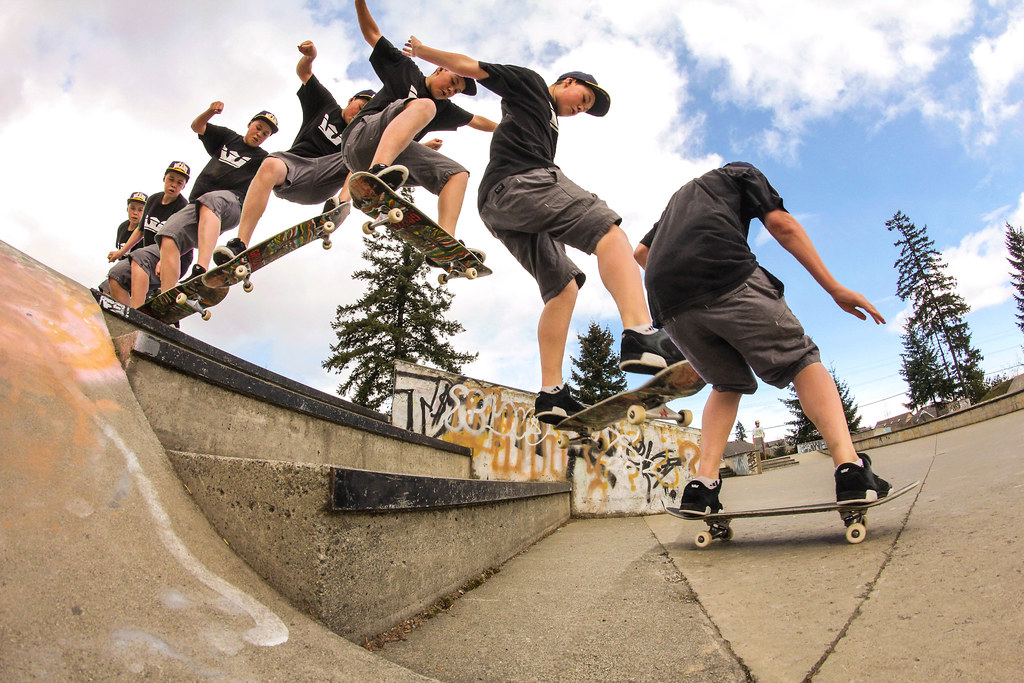
Duplicity Shot: (20 marks) ( to be resized to 8x10 and printed out as well as posted onto Flickr in an album ) Students should use a tripod or monopod to shoot an individual in an interesting background in 4 different positions. All the photos should be shot on the same day at the same time and edited the same way. Then the photos will be edited in Photoshop using layers creating one final photo with all four pictures in it. You will create layers and position each photo into a new layer. When you are ready to print out see Ms. Chase first. NOTE: i have taught how to do this in class, but I am happy to walk students through this process again when they have their photos ready to put into Photoshop.
Photo by Keisja Cox
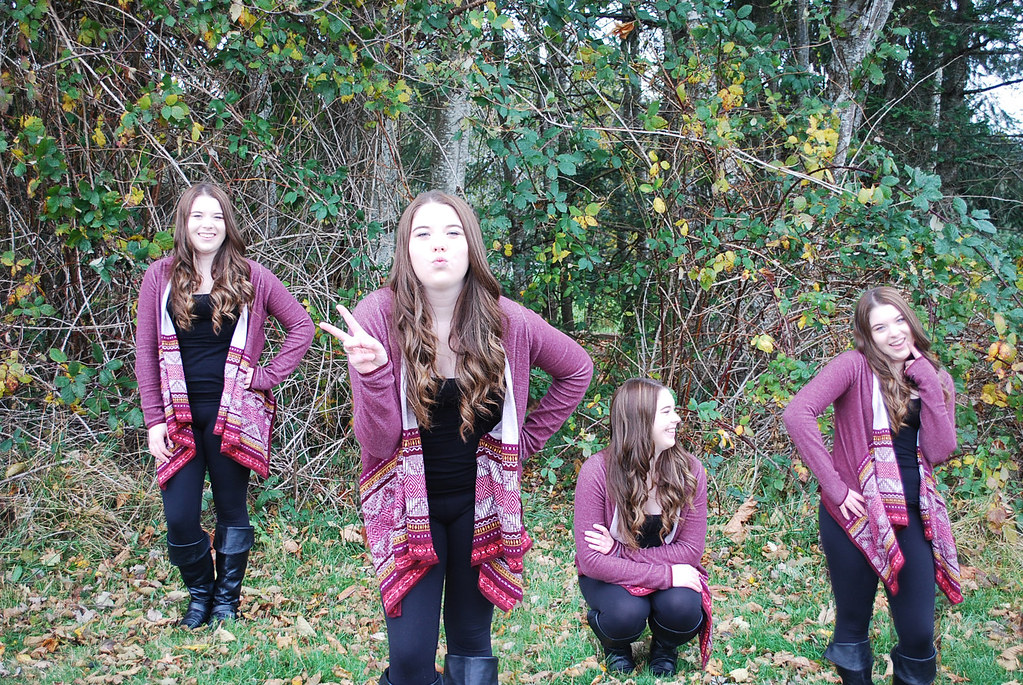
Photo by Jean Marc Poirer
Slideshow: (50 marks) Continue working on creating 50 of your best shots in a slideshow set to music. Only 10 assignment shots or shots prior to this class can be used.
Overlay #2: (5 marks) Using Photoshop, create a new photo by putting two artistic photos together. This is the same assignment as above but with two different photos in a more advanced editing program. (Practice)
Overlay #3: (10 marks) This is an art piece. This assignment will require you to shoot two photos with the intent to create an overlay. In this case, you are not taking photos you have already taken but rather choosing to shoot two photos with the intent to create an overlay.( Good Quality Artistic piece expected)
See sample photo of Amelia C by Mai Nguyen
Duplicity Shot: (20 marks) ( to be resized to 8x10 and printed out as well as posted onto Flickr in an album ) Students should use a tripod or monopod to shoot an individual in an interesting background in 4 different positions. All the photos should be shot on the same day at the same time and edited the same way. Then the photos will be edited in Photoshop using layers creating one final photo with all four pictures in it. You will create layers and position each photo into a new layer. When you are ready to print out see Ms. Chase first. NOTE: i have taught how to do this in class, but I am happy to walk students through this process again when they have their photos ready to put into Photoshop.
Photo by Keisja Cox
Photo by Jean Marc Poirer
Slideshow: (50 marks) Continue working on creating 50 of your best shots in a slideshow set to music. Only 10 assignment shots or shots prior to this class can be used.
Subscribe to:
Posts (Atom)